


The Best Fortinet FCSS_LED_AR-7.6 Study Guides and Dumps of 2026
Top Fortinet FCSS_LED_AR-7.6 Exam Audio Study Guide! Practice Questions Edition
NEW QUESTION # 16
Which configuration elements are required to assign a VLAN to a FortiSwitch port?
(Choose two)
Response:
- A. Assign VLAN to switch port profile
- B. Enable DHCP relay on VLAN
- C. Define VLAN ID in FortiGate
- D. Create a static route
Answer: A,C
NEW QUESTION # 17
You're configuring FortiAuthenticator to authenticate users via LDAP. Which syntax correctly defines the LDAP query filter to retrieve users from a specific OU named "Engineering"?
Response:
- A. (&(objectClass=person)(ou=Engineering))
- B. (cn=Engineering)
- C. (ou=Engineering)
- D. (OU=Engineering,DC=example,DC=com)
Answer: A
NEW QUESTION # 18
When configuring FortiLink in FortiManager to manage FortiSwitch, which of the following steps are mandatory?
(Choose two)
Response:
- A. Import FortiSwitch configuration template into FortiManager
- B. Enable FortiLink interface on FortiGate
- C. Configure switch controller in FortiGate policies
- D. Apply provisioning template to FortiAP
Answer: A,B
NEW QUESTION # 19
You want to create an SSID named "CORP" on FortiManager and assign it to a FortiAP. Which steps are required?
(Choose three)
Response:
- A. Reboot AP
- B. Assign profile to FortiAP
- C. Push configuration to FortiGate
- D. Define SSID under AP Profile
Answer: B,C,D
NEW QUESTION # 20
What is the main benefit of VLAN pooling in wireless deployments?
Response:
- A. Disables rogue AP detection
- B. Reduces DHCP exhaustion and improves load distribution
- C. Forces clients to connect via MAC address
- D. Enables NAT between VLANs
Answer: B
NEW QUESTION # 21
Refer to the exhibits.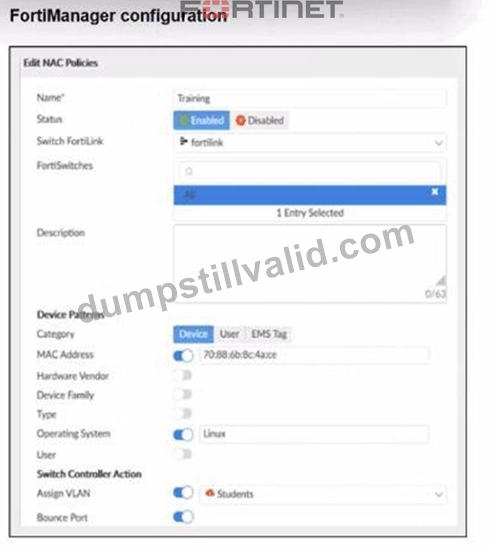

Examine the FortiManager configuration and FortiGate CLI output shown in the exhibit.
The NAC feature is being tested with a device connected to port2 on managed FortiSwitch S224SPTF19005867. The NAC policy has been applied to port2, and traffic was generated from the test device. However, the traffic from the test device does not match the NAC policy and remains in the onboarding VLAN.
What are two possible reasons why the test device is not being correctly classified by the NAC policy?
(Choose two.)
- A. Management communication between FortiGate and FortiSwitch is down.
- B. The device operating system detected by FortiGate is not Linux.
- C. The MAC address configured on the NAC policy is incorrect.
- D. Device detection is not enabled on VLAN 4089.
Answer: B,D
Explanation:
From the FortiManager NAC policy:
* Category =Device
* Match criteria includeMAC addressandOperating System = Linux
* Action =Assign VLAN "Students"
From the FortiGate CLI:
diagnose switch-controller switch-info mac-table ...
MAC: 70:88:6b:8c:4a:ce VLAN: 4089 Port: port2
diagnose switch-controller mac-device mac onboarding
VLAN 4089 MAC 70:88:6b:8c:4a:ce
So the device is stuck inVLAN 4089, which is theonboarding VLAN. No NAC policy is matched.
For a NAC policy to match, FortiGate needsdevice-identity information, which comes fromdevice detection on the VLAN / FortiLink interfaceplus theattributes that the policy expects(OS, MAC, etc.).
* A. Device detection is not enabled on VLAN 4089.
* If device detection is disabled on the interface/VLAN where the endpoint lives, FortiGate cannot learn OS / device info.
* Without this, the NAC engine cannot compare against the NAC policy (which relies on OS and other attributes), so the device remains in the onboarding VLAN.#This is a valid root cause.
* B. The device operating system detected by FortiGate is not Linux.
* The NAC policy explicitly requiresOperating System = Linux.
* If the endpoint is actually Windows/macOS, or the OS fingerprint is still "Unknown", the policy will never match, and the device stays in onboarding.#Also a valid reason.
* C. Management communication between FortiGate and FortiSwitch is down.
* CLI output (switch-info mac-table and mac-device) proves FortiGate is talking to the switch and sees MAC/VLAN/port information.#Not a valid reason.
* D. The MAC address configured on the NAC policy is incorrect.
* The exhibits show the MAC in the NAC policy matches the MAC appearing in the MAC table.
#Not the cause here.
NEW QUESTION # 22
What role does FortiAuthenticator play in a guest access workflow with FortiGate?
Response:
- A. Captures traffic logs
- B. Deploys firmware to clients
- C. Acts as a DHCP server
- D. Authenticates guest users via SMS or email
Answer: D
NEW QUESTION # 23
A network engineer is deploying FortiGate devices using zero-touch provisioning (ZTP). The devices must automatically connect to FortiManager and receive their configurations upon first boot. However, after powering on the devices, they fail to register with FortiManager.
What could be a possible cause of this issue?
- A. In this scenario, the ZTP process works only when devices are connected using a console cable.
- B. The FortiManager IP address is not reachable over TCP port 541.
- C. The FortiGate device must be preloaded with a configuration file before ZTP can function.
- D. The FortiGate device requires manual intervention to accept the FortiManager connection.
Answer: B
Explanation:
Zero-Touch Provisioning (ZTP) for FortiGate devices is handled throughFortiDeploy, which automatically connects a FortiGate toFortiManagerso the device can download configuration templates and be centrally managed.
For ZTP to work, the newly booted FortiGate must successfully reach FortiManager. One of thecritical requirementsis connectivity over theFGFM (FortiGate-FortiManager) management protocol, which uses:
TCP Port 541
This is clearly stated in multiple Fortinet documents:
* FortiGate Cloud Admin Guidelists port541as the management channel used for FortiGate # FortiManager / FortiGate Cloud communications:"Management... Protocol: TCP, Port:541"
* FortiOS Administration Guidealso confirms this:"FortiManager provides remote management of FortiGate devices overTCP port 541." Since ZTP uses FortiDeploy to push the FortiManager IP to the device and relies on FGFM (port 541) for registration and configuration delivery,any failure on this port breaks the entire ZTP workflow.
Why option D is correct
If the FortiGate cannot reach FortiManager onTCP/541, itcannot register, cannot be authorized, and cannot receive its configuration - leading to a ZTP failure.
This is themost common causein real deployments:
* Firewall blocking TCP/541
* Upstream NAT device not forwarding 541
* ISP restrictions
* Incorrect FortiManager IP or routing issue
* ZTP device behind a network that does not allow outbound 541
Why the other options are incorrect
A). The FortiGate device requires manual intervention to accept the FortiManager connection.
Incorrect.
ZTP is built specifically to avoid manual intervention. Once the FortiDeploy key is used, the device auto- connects to FortiManager without needing local acceptance.
B). ZTP works only when devices are connected using a console cable.
Incorrect.
ZTP requiresno console cable- that's the whole point. It relies on DHCP, WAN connectivity, and FortiDeploy auto-join.
C). The FortiGate device must be preloaded with a configuration file before ZTP can function.
Incorrect.
Preloading configuration defeats the purpose of ZTP.
ZTP delivers the initial configuration automatically from FortiManager using FortiDeploy.
LAN Edge 7.6 Architect Context
LAN Edge deployments often use FortiManager as the central orchestrator for:
* FortiSwitch management via FortiLink
* FortiAP wireless provisioning
* SD-Branch configuration templates
* Security Fabric automation
For all of this, ZTP enables remote sites to deploy FortiGate, FortiSwitch, and FortiAP withno on-site expertise.
If TCP/541 to FortiManager is blocked, the entire LAN Edge deployment pipeline fails, making optionDthe only valid and document-supported answer.
NEW QUESTION # 24
APs have been manually configured to connect to FortiGate over an IPsec network, and FortiGate successfully detects and authorizes them. However, the APs remain unmanaged because FortiGate is unable to establish a CAPWAP tunnel with them.
What configuration change can resolve this issue and enable FortiGate to establish the CAPWAP tunnel over the IPsec connection?
- A. Configure a static route on FortiGate to reach the APs over the IPsec tunnel.
- B. Decrease the CAPWAP tunnel MTU size for APs to prevent fragmentation.
- C. Assign a custom AP profile for the remote APs with the set mpls-connection option enabled.
- D. Upgrade the FortiAP firmware image to ensure compatibility with the FortiOS version.
Answer: C
Explanation:
When FortiAPs connect to FortiGate overIPsec tunnels, this is treated similarly to WAN/MPLS deployments.
In these scenarios, FortiGate must know that CAPWAP must traverse anon-L2transport.
FortiAP profiles include:
set mpls-connection enable
This setting is required so that:
* FortiGate can encapsulate CAPWAP inside the transport tunnel
* Remote FortiAPs can establish CAPWAP even when behind routed/IPsec networks Without this option, the FortiGate detects the AP butcannot bring CAPWAP UP, leaving the AP in
"discovered/unauthorized" or "offline" state.
Why others are wrong
* A. Static route# Discovery already succeeds, so routing is not the issue.
* C. Reduce MTU# Sometimes useful for IPsec, but not required for CAPWAP establishment.
* D. Firmware upgrade# Firmware mismatch would show "Managed (upgrade required)," not CAPWAP tunnel failure.
Therefore,set mpls-connection enableis the required fix.
NEW QUESTION # 25
You are setting up FortiAuthenticator to query users from Active Directory. Which bind method must be used for secure authentication?
Response:
- A. Local User Bind
- B. NTLM
- C. Anonymous Bind
- D. Simple Bind over SSL
Answer: D
NEW QUESTION # 26
When integrating FortiAuthenticator with an LDAP server, which parameter must be correctly defined to perform user lookups?
Response:
- A. Syslog filter
- B. Group name
- C. DN (Distinguished Name)
- D. Shared secret
Answer: C
NEW QUESTION # 27
You are configuring a new wireless network for your organization. The network requires users to authenticate through a RADIUS server for secure access. Which two security modes should you select when creating the SSID to ensure compatibility with the RADIUS server?
(Choose two.)
Response:
- A. WPA3-Enterprise
- B. WPA-Personal
- C. WPA/WPA2 Mixed Mode
- D. WEP
- E. WPA2-Enterprise
Answer: A,C
NEW QUESTION # 28
What are the benefits of managing FortiSwitch using FortiManager over FortiLink?
(Choose two)
Response:
- A. Centralized policy and template deployment
- B. Requirement for separate FortiAnalyzer
- C. CLI-only control for all switches
- D. Backup configuration versioning
Answer: A,D
NEW QUESTION # 29
You are troubleshooting a Syslog-based single sign-on (SSO) issue on FortiAuthenticator, where user authentication is not being correctly mapped from the syslog messages. You need a tool to diagnose the issue and understand the logs to resolve it quickly.
Which tool in FortiAuthenticator can you use to troubleshoot and diagnose a Syslog SSO issue?
- A. Debug logs > Single Sign-On > Syslog SSO
- B. Debug logs > Remote Servers > Syslog Viewer
- C. Parsing Test Tool
- D. Debug logs > SSO Sessions page
Answer: A
Explanation:
Context: You're troubleshootingSyslog-based SSOonFortiAuthenticator:
* Devices (typically firewalls, WLAN controllers, VPN gateways) sendsyslog messagescontaining usernames, IPs, login/logout events.
* FortiAuthenticator parses those logs usingSyslog SSO rulesand injects logon sessions intoFSSOfor FortiGate.
When users are not mapping correctly, you need to see:
* Did the syslog message arrive?
* Which matching rule (if any) caught it?
* What username and IP were extracted?
* Why was a message ignored or rejected?
FortiAuthenticator has a dedicated debug area for this:
Debug logs # Single Sign-On # Syslog SSO
This view shows:
* Raw syslog lines received
* Thematching ruleapplied (or "no match")
* Parsed fields (username, IP, group)
* Any parsing errors
This is exactly the tool designed totroubleshoot and diagnose Syslog SSO issues.
Why the other options are not the best for this issue
* A. Debug logs > Remote Servers > Syslog Viewer
* Lets you see syslog traffic in general, but doesnotshow how SSO rules are applied or why they fail. Good for connectivity checks, not SSO logic.
* B. Parsing Test Tool
* Useful totestpatterns and rules manually by pasting sample log lines, but it doesn't show live traffic or running SSO sessions.
* C. Debug logs > SSO Sessions page
* Shows existing SSO sessions (who is logged in), but notwhya particular syslog message did not create a session.
NEW QUESTION # 30
What is the default RSSO attribute FortiAuthenticator uses to group users?
Response:
- A. Class
- B. CN
- C. Filter-ID
- D. Group-ID
Answer: C
NEW QUESTION # 31
In a Windows environment using AD machine authentication, how does FortiAuthenticator ensure that a previously authenticated device is maintaining its network access once the device resumes operating after sleep or hibernation?
- A. It caches the MAC address of authenticated devices for a configurable period of time.
- B. It uses machine authentication based on the device IP address.
- C. It temporarily assigns the device to a guest VLAN until full reauthentication is completed.
- D. It sends a wake-on-LAN packet to trigger reauthentication.
Answer: A
Explanation:
WithAD machine authenticationvia FortiAuthenticator:
* When a machine successfully authenticates, FortiAuthenticator records:
* Machine account / identity
* MAC addressof the device
* Associated IP and session info
To handle sleep/hibernation:
* FortiAuthenticator keeps acache of authenticated MAC addressesfor a configured timeout.
* When the device wakes up and sends traffic again, FortiAuthenticator/FSSO can still treat it as authenticated as long as its MAC is in cache, so access is maintained without forcing a full machine re- auth immediately.
This matches optionD.
* A(guest VLAN) is not the standard behavior here.
* B(WoL) is unrelated.
* C(IP-based) would break as IPs can change; MAC-based caching is what's used.
NEW QUESTION # 32
Which LDAP object class should you target in your FortiAuthenticator LDAP query to identify user accounts?
Response:
- A. inetOrgPerson
- B. organizationalUnit
- C. userAccount
- D. objectGroup
Answer: A
NEW QUESTION # 33
Which log category must be selected to capture authentication logs in FortiAuthenticator's syslog settings?
Response:
- A. Policy
- B. Authentication
- C. System Events
- D. Debug
Answer: B
NEW QUESTION # 34
......
Valid FCSS_LED_AR-7.6 Exam Updates - 2026 Study Guide: https://www.dumpstillvalid.com/FCSS_LED_AR-7.6-prep4sure-review.html
FCSS_LED_AR-7.6 Certification - The Ultimate Guide: https://drive.google.com/open?id=1b47ZpYLMRX5udv-okeKkrVsoxN6miFhs
