


ARA-R01 Free Update With 100% Exam Passing Guarantee [2024]
[Jun-2024] Verified Snowflake Exam Dumps with ARA-R01 Exam Study Guide
NEW QUESTION # 59
The following table exists in the production database:
A regulatory requirement states that the company must mask the username for events that are older than six months based on the current date when the data is queried.
How can the requirement be met without duplicating the event data and making sure it is applied when creating views using the table or cloning the table?
- A. Use a masking policy on the username column with event_timestamp as a conditional column.
- B. Use a secure view on the user_events table using a case statement on the username column.
- C. Use a masking policy on the username column using a entitlement table with valid dates.
- D. Use a row level policy on the user_events table using a entitlement table with valid dates.
Answer: A
Explanation:
A masking policy is a feature of Snowflake that allows masking sensitive data in query results based on the role of the user and the condition of the data. A masking policy can be applied to a column in a table or a view, and it can use another column in the same table or view as a conditional column. A conditional column is a column that determines whether the masking policy is applied or not based on its value1.
In this case, the requirement can be met by using a masking policy on the username column with event_timestamp as a conditional column. The masking policy can use a function that masks the username if the event_timestamp is older than six months based on the current date, and returns the original username otherwise. The masking policy can be applied to the user_events table, and it will also be applied when creating views using the table or cloning the table2.
The other options are not correct because:
A). Using a masking policy on the username column using an entitlement table with valid dates would require creating another table that stores the valid dates for each username, and joining it with the user_events table in the masking policy function. This would add complexity and overhead to the masking policy, and it would not use the event_timestamp column as the condition for masking.
B). Using a row level policy on the user_events table using an entitlement table with valid dates would require creating another table that stores the valid dates for each username, and joining it with the user_events table in the row access policy function. This would filter out the rows that have event_timestamp older than six months based on the valid dates, instead of masking the username column. This would not meet the requirement of masking the username, and it would also reduce the visibility of the event data.
D). Using a secure view on the user_events table using a case statement on the username column would require creating a view that uses a case expression to mask the username column based on the event_timestamp column. This would meet the requirement of masking the username, but it would not be applied when cloning the table. A secure view is a view that prevents the underlying data from being exposed by queries on the view. However, a secure view does not prevent the underlying data from being exposed by cloning the table3.
References:
1: Masking Policies | Snowflake Documentation
2: Using Conditional Columns in Masking Policies | Snowflake Documentation
3: Secure Views | Snowflake Documentation
NEW QUESTION # 60
The following DDL command was used to create a task based on a stream:
Assuming MY_WH is set to auto_suspend - 60 and used exclusively for this task, which statement is true?
- A. The warehouse MY_WH will never suspend.
- B. The warehouse MY_WH will automatically resize to accommodate the size of the stream.
- C. The warehouse MY_WH will only be active when there are results in the stream.
- D. The warehouse MY_WH will be made active every five minutes to check the stream.
Answer: C
Explanation:
The warehouse MY_WH will only be active when there are results in the stream. This is because the task is created based on a stream, which means that the task will only be executed when there are new data in the stream. Additionally, the warehouse is set to auto_suspend - 60, which means that the warehouse will automatically suspend after 60 seconds of inactivity. Therefore, the warehouse will only be active when there are results in the stream. References:
[CREATE TASK | Snowflake Documentation]
[Using Streams and Tasks | Snowflake Documentation]
[CREATE WAREHOUSE | Snowflake Documentation]
NEW QUESTION # 61
Based on the Snowflake object hierarchy, what securable objects belong directly to a Snowflake account?
(Select THREE).
- A. Schema
- B. Database
- C. Table
- D. Role
- E. Stage
- F. Warehouse
Answer: B,D,F
Explanation:
A securable object is an entity to which access can be granted in Snowflake. Securable objects include databases, schemas, tables, views, stages, pipes, functions, procedures, sequences, tasks, streams, roles, warehouses, and shares1.
The Snowflake object hierarchy is a logical structure that organizes the securable objects in a nested manner. The top-most container is the account, which contains all the databases, roles, and warehouses for the customer organization. Each database contains schemas, which in turn contain tables, views, stages, pipes, functions, procedures, sequences, tasks, and streams. Each role can be granted privileges on other roles or securable objects. Each warehouse can be used to execute queries on securable objects2.
Based on the Snowflake object hierarchy, the securable objects that belong directly to a Snowflake account are databases, roles, and warehouses. These objects are created and managed at the account level, and do not depend on any other securable object. The other options are not correct because:
Schemas belong to databases, not to accounts. A schema must be created within an existing database3.
Tables belong to schemas, not to accounts. A table must be created within an existing schema4.
Stages belong to schemas or tables, not to accounts. A stage must be created within an existing schema or table.
References:
1: Overview of Access Control | Snowflake Documentation
2: Securable Objects | Snowflake Documentation
3: CREATE SCHEMA | Snowflake Documentation
4: CREATE TABLE | Snowflake Documentation
[5]: CREATE STAGE | Snowflake Documentation
NEW QUESTION # 62
An Architect needs to design a data unloading strategy for Snowflake, that will be used with the COPY INTO
<location> command.
Which configuration is valid?
- A. Location of files: Snowflake internal location
. File formats: CSV, XML
. File encoding: UTF-8
. Encryption: 128-bit - B. Location of files: Azure ADLS
. File formats: JSON, XML, Avro, Parquet, ORC
. Compression: bzip2
. Encryption: User-supplied key - C. Location of files: Google Cloud Storage
. File formats: Parquet
. File encoding: UTF-8
Compression: gzip - D. Location of files: Amazon S3
. File formats: CSV, JSON
. File encoding: Latin-1 (ISO-8859)
. Encryption: 128-bit
Answer: C
Explanation:
For the configuration of data unloading in Snowflake, the valid option among the provided choices is "C." This is because Snowflake supports unloading data into Google Cloud Storage using the COPY INTO
<location> command with specific configurations. The configurations listed in option C, such as Parquet file format with UTF-8 encoding and gzip compression, are all supported by Snowflake. Notably, Parquet is a columnar storage file format, which is optimal for high-performance data processing tasks in Snowflake. The UTF-8 file encoding and gzip compression are both standard and widely used settings that are compatible with Snowflake's capabilities for data unloading to cloud storage platforms.References:
* Snowflake Documentation on COPY INTO command
* Snowflake Documentation on Supported File Formats
* Snowflake Documentation on Compression and Encoding Options
NEW QUESTION # 63
The diagram shows the process flow for Snowpipe auto-ingest with Amazon Simple Notification Service (SNS) with the following steps:
Step 1: Data files are loaded in a stage.
Step 2: An Amazon S3 event notification, published by SNS, informs Snowpipe - by way of Amazon Simple Queue Service (SQS) - that files are ready to load. Snowpipe copies the files into a queue.
Step 3: A Snowflake-provided virtual warehouse loads data from the queued files into the target table based on parameters defined in the specified pipe.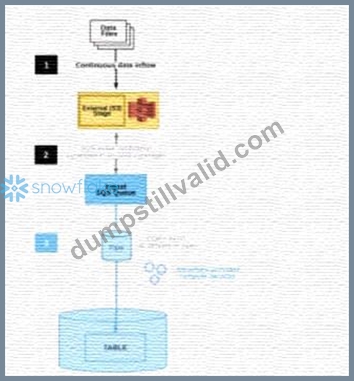
If an AWS Administrator accidentally deletes the SQS subscription to the SNS topic in Step 2, what will happen to the pipe that references the topic to receive event messages from Amazon S3?
- A. The pipe will no longer be able to receive the messages and the user must wait for 24 hours from the time when the SNS topic subscription was deleted. Pipe recreation is not required as the pipe will reuse the same subscription to the existing SNS topic after 24 hours.
- B. The pipe will continue to receive the messages as Snowflake will automatically restore the subscription by creating a new SNS topic. Snowflake will then recreate the pipe by specifying the new SNS topic name in the pipe definition.
- C. The pipe will no longer be able to receive the messages. To restore the system immediately, the user needs to manually create a new SNS topic with a different name and then recreate the pipe by specifying the new SNS topic name in the pipe definition.
- D. The pipe will continue to receive the messages as Snowflake will automatically restore the subscription to the same SNS topic and will recreate the pipe by specifying the same SNS topic name in the pipe definition.
Answer: C
Explanation:
If an AWS Administrator accidentally deletes the SQS subscription to the SNS topic in Step 2, the pipe that references the topic to receive event messages from Amazon S3 will no longer be able to receive the messages.
This is because the SQS subscription is the link between the SNS topic and the Snowpipe notification channel.
Without the subscription, the SNS topic will not be able to send notifications to the Snowpipe queue, and the pipe will not be triggered to load the new files. To restore the system immediately, the user needs to manually create a new SNS topic with a different name and then recreate the pipe by specifying the new SNS topic name in the pipe definition. This will create a new notification channel and a new SQS subscription for the pipe. Alternatively, the user can also recreate the SQS subscription to the existing SNS topic and then alter the pipe to use the same SNS topic name in the pipe definition. This will also restore the notification channel and the pipe functionality. References:
* Automating Snowpipe for Amazon S3
* Enabling Snowpipe Error Notifications for Amazon SNS
* HowTo: Configuration steps for Snowpipe Auto-Ingest with AWS S3 Stages
NEW QUESTION # 64
How do Snowflake databases that are created from shares differ from standard databases that are not created from shares? (Choose three.)
- A. Shared databases are not supported by Time Travel.
- B. Shared databases will have the PUBLIC or INFORMATION_SCHEMA schemas without explicitly granting these schemas to the share.
- C. Shared databases are read-only.
- D. Shared databases can also be created as transient databases.
- E. Shared databases cannot be cloned.
- F. Shared databases must be refreshed in order for new data to be visible.
Answer: A,C,E
Explanation:
According to the SnowPro Advanced: Architect documents and learning resources, the ways that Snowflake databases that are created from shares differ from standard databases that are not created from shares are:
Shared databases are read-only. This means that the data consumers who access the shared databases cannot modify or delete the data or the objects in the databases. The data providers who share the databases have full control over the data and the objects, and can grant or revoke privileges on them1.
Shared databases cannot be cloned. This means that the data consumers who access the shared databases cannot create a copy of the databases or the objects in the databases. The data providers who share the databases can clone the databases or the objects, but the clones are not automatically shared2.
Shared databases are not supported by Time Travel. This means that the data consumers who access the shared databases cannot use the AS OF clause to query historical data or restore deleted data. The data providers who share the databases can use Time Travel on the databases or the objects, but the historical data is not visible to the data consumers3.
The other options are incorrect because they are not ways that Snowflake databases that are created from shares differ from standard databases that are not created from shares. Option B is incorrect because shared databases do not need to be refreshed in order for new data to be visible. The data consumers who access the shared databases can see the latest data as soon as the data providers update the data1. Option E is incorrect because shared databases will not have the PUBLIC or INFORMATION_SCHEMA schemas without explicitly granting these schemas to the share. The data consumers who access the shared databases can only see the objects that the data providers grant to the share, and the PUBLIC and INFORMATION_SCHEMA schemas are not granted by default4. Option F is incorrect because shared databases cannot be created as transient databases. Transient databases are databases that do not support Time Travel or Fail-safe, and can be dropped without affecting the retention period of the data. Shared databases are always created as permanent databases, regardless of the type of the source database5. References: Introduction to Secure Data Sharing | Snowflake Documentation, Cloning Objects | Snowflake Documentation, Time Travel | Snowflake Documentation, Working with Shares | Snowflake Documentation, CREATE DATABASE | Snowflake Documentation
NEW QUESTION # 65
Which Snowflake objects can be used in a data share? (Select TWO).
- A. Stream
- B. Standard view
- C. Stored procedure
- D. External table
- E. Secure view
Answer: B,E
Explanation:
Data sharing is a feature that allows you to share selected objects in a database in your account with other Snowflake accounts. You can share the following Snowflake database objects: external tables, dynamic tables, secure views, secure materialized views, secure UDFs, and tables. However, not all of these objects can be used in a data share. A data share is a named object that encapsulates the information required to share a database. You can grant privileges on objects to a share either via a database role or directly to a share. The objects that can be granted privileges directly to a share are: standard views, secure views, secure UDFs, and tables.
Therefore, the correct answer is A and B.
The other options are incorrect because they cannot be granted privileges directly to a share. External tables, dynamic tables, and streams can only be shared via a database role. Stored procedures cannot be shared at all. References:
[Introduction to Secure Data Sharing] 1
[Working with Shares] 2
[Choosing How to Share Database Objects] 3
NEW QUESTION # 66
The IT Security team has identified that there is an ongoing credential stuffing attack on many of their organization's system.
What is the BEST way to find recent and ongoing login attempts to Snowflake?
- A. View the Users section in the Account tab in the Snowflake UI and review the last login column.
- B. Call the LOGIN_HISTORY Information Schema table function.
- C. View the History tab in the Snowflake UI and set up a filter for SQL text that contains the text
"LOGIN". - D. Query the LOGIN_HISTORY view in the ACCOUNT_USAGE schema in the SNOWFLAKE database.
Answer: D
Explanation:
This view can be used to query login attempts by Snowflake users within the last 365 days (1 year). It provides information such as the event timestamp, the user name, the client IP, the authentication method, the success or failure status, and the error code or message if the login attempt was unsuccessful. By querying this view, the IT Security team can identify any suspicious or malicious login attempts to Snowflake and take appropriate actions to prevent credential stuffing attacks1. The other options are not the best ways to find recent and ongoing login attempts to Snowflake. Option A is incorrect because the LOGIN_HISTORY Information Schema table function only returns login events within the last 7 days, which may not be sufficient to detect credential stuffing attacks that span a longer period of time2. Option C is incorrect because the History tab in the Snowflake UI only shows the queries executed by the current user or role, not the login events of other users or roles3. Option D is incorrect because the Users section in the Account tab in the Snowflake UI only shows the last login time for each user, not the details of the login attempts or the failures.
NEW QUESTION # 67
A group of Data Analysts have been granted the role analyst role. They need a Snowflake database where they can create and modify tables, views, and other objects to load with their own data. The Analysts should not have the ability to give other Snowflake users outside of their role access to this data.
How should these requirements be met?
- A. Grant ANALYST_R0LE OWNERSHIP on the database, but make sure that ANALYST_ROLE does not have the MANAGE GRANTS privilege on the account.
- B. Grant SYSADMIN ownership of the database, but grant the create schema privilege on the database to the ANALYST_ROLE.
- C. Grant ANALYST_ROLE ownership on the database, but grant the ownership on future [object type] s in database privilege to SYSADMIN.
- D. Make every schema in the database a managed access schema, owned by SYSADMIN, and grant create privileges on each schema to the ANALYST_ROLE for each type of object that needs to be created.
Answer: D
Explanation:
The requirements state that the data analysts need to be able to create and modify database objects and load data, but should not be able to manage access for users outside of their role.
Option C: By making each schema within the database a managed access schema and having them owned by SYSADMIN, the ability to grant privileges on the schema's objects is strictly controlled. Managed access schemas limit the granting of privileges to the role specified as the owner of the schema, in this case, SYSADMIN. The ANALYST_ROLE can be granted the privileges necessary to create and modify objects within these schemas, satisfying the requirement for the analysts to perform their tasks without being able to extend access beyond their role.
NEW QUESTION # 68
A Snowflake Architect Is working with Data Modelers and Table Designers to draft an ELT framework specifically for data loading using Snowpipe. The Table Designers will add a timestamp column that Inserts the current tlmestamp as the default value as records are loaded into a table. The Intent is to capture the time when each record gets loaded into the table; however, when tested the timestamps are earlier than the loae_take column values returned by the copy_history function or the Copy_HISTORY view (Account Usage).
Why Is this occurring?
- A. The Snowflake timezone parameter Is different from the cloud provider's parameters causing the mismatch.
- B. The Table Designer team has not used the localtimestamp or systimestamp functions in the Snowflake copy statement.
- C. The timestamps are different because there are parameter setup mismatches. The parameters need to be realigned
- D. The CURRENT_TIMEis evaluated when the load operation is compiled in cloud services rather than when the record is inserted into the table.
Answer: D
Explanation:
* The correct answer is D because the CURRENT_TIME function returns the current timestamp at the start of the statement execution, not at the time of the record insertion. Therefore, if the load operation takes some time to complete, the CURRENT_TIME value may be earlier than the actual load time.
* Option A is incorrect because the parameter setup mismatches do not affect the timestamp values. The parameters are used to control the behavior and performance of the load operation, such as the file format, the error handling, the purge option, etc.
* Option B is incorrect because the Snowflake timezone parameter and the cloud provider's parameters are independent of each other. The Snowflake timezone parameter determines the session timezone for displaying and converting timestamp values, while the cloud provider's parameters determine the physical location and configuration of the storage and compute resources.
* Option C is incorrect because the localtimestamp and systimestamp functions are not relevant for the Snowpipe load operation. The localtimestamp function returns the current timestamp in the session timezone, while the systimestamp function returns the current timestamp in the system timezone.
Neither of them reflect the actual load time of the records. References:
* Snowflake Documentation: Loading Data Using Snowpipe: This document explains how to use
* Snowpipe to continuously load data from external sources into Snowflake tables. It also describes the syntax and usage of the COPY INTO command, which supports various options and parameters to control the loading behavior.
* Snowflake Documentation: Date and Time Data Types and Functions: This document explains the different data types and functions for working with date and time values in Snowflake. It also describes how to set and change the session timezone and the system timezone.
* Snowflake Documentation: Querying Metadata: This document explains how to query the metadata of the objects and operations in Snowflake using various functions, views, and tables. It also describes how to access the copy history information using the COPY_HISTORY function or the COPY_HISTORY view.
NEW QUESTION # 69
Files arrive in an external stage every 10 seconds from a proprietary system. The files range in size from 500 K to 3 MB. The data must be accessible by dashboards as soon as it arrives.
How can a Snowflake Architect meet this requirement with the LEAST amount of coding? (Choose two.)
- A. Use a COPY command with a task.
- B. Use the COPY INTO command.
- C. Use Snowpipe with auto-ingest.
- D. Use a materialized view on an external table.
- E. Use a combination of a task and a stream.
Answer: C,D
Explanation:
These two options are the best ways to meet the requirement of loading data from an external stage and making it accessible by dashboards with the least amount of coding.
Snowpipe with auto-ingest is a feature that enables continuous and automated data loading from an external stage into a Snowflake table. Snowpipe uses event notifications from the cloud storage service to detect new or modified files in the stage and triggers a COPY INTO command to load the data into the table. Snowpipe is efficient, scalable, and serverless, meaning it does not require any infrastructure or maintenance from the user. Snowpipe also supports loading data from files of any size, as long as they are in a supported format1.
A materialized view on an external table is a feature that enables creating a pre-computed result set from an external table and storing it in Snowflake. A materialized view can improve the performance and efficiency of querying data from an external table, especially for complex queries or dashboards. A materialized view can also support aggregations, joins, and filters on the external table data. A materialized view on an external table is automatically refreshed when the underlying data in the external stage changes, as long as the AUTO_REFRESH parameter is set to true2.
References:
Snowpipe Overview | Snowflake Documentation
Materialized Views on External Tables | Snowflake Documentation
NEW QUESTION # 70
What are some of the characteristics of result set caches? (Choose three.)
- A. Snowflake persists the data results for 24 hours.
- B. The retention period can be reset for a maximum of 31 days.
- C. The result set cache is not shared between warehouses.
- D. Time Travel queries can be executed against the result set cache.
- E. Each time persisted results for a query are used, a 24-hour retention period is reset.
- F. The data stored in the result cache will contribute to storage costs.
Answer: A,C,E
Explanation:
In Snowflake, the characteristics of result set caches include persistence of data results for 24 hours (B), each use of persisted results resets the 24-hour retention period (C), and result set caches are not shared between different warehouses (F). The result set cache is specifically designed to avoid repeated execution of the same query within this timeframe, reducing computational overhead and speeding up query responses. These caches do not contribute to storage costs, and their retention period cannot be extended beyond the default duration nor up to 31 days, as might be misconstrued.References: Snowflake Documentation on Result Set Caching.
NEW QUESTION # 71
Company A would like to share data in Snowflake with Company B.
Company B is not on the same cloud platform as Company A.
What is required to allow data sharing between these two companies?
- A. Ensure that all views are persisted, as views cannot be shared across cloud platforms.
- B. Setup data replication to the region and cloud platform where the consumer resides.
- C. Create a pipeline to write shared data to a cloud storage location in the target cloud provider.
- D. Company A and Company B must agree to use a single cloud platform: Data sharing is only possible if the companies share the same cloud provider.
Answer: B
Explanation:
According to the SnowPro Advanced: Architect documents and learning resources, the requirement to allow data sharing between two companies that are not on the same cloud platform is to set up data replication to the region and cloud platform where the consumer resides. Data replication is a feature of Snowflake that enables copying databases across accounts in different regions and cloud platforms. Data replication allows data providers to securely share data with data consumers across different regions and cloud platforms by creating a replica database in the consumer's account. The replica database is read-only and automatically synchronized with the primary database in the provider's account. Data replication is useful for scenarios where data sharing is not possible ordesirable due to latency, compliance, or security reasons1. The other options are incorrect because they are not required or feasible to allow data sharing between two companies that are not on the same cloud platform. Option A is incorrect because creating a pipeline to write shared data to a cloud storage location in the target cloud provider is not a secure or efficient way of sharing data. It would require additional steps to load the data from the cloud storage to the consumer's account, and it would not leverage the benefits of Snowflake's data sharing features. Option B is incorrect because ensuring that all views are persisted is not relevant for data sharing across cloud platforms. Views can be shared across cloud platforms as long as they reference objects in the same database. Persisting views is an option to improve the performance of querying views, but it is not required for data sharing2. Option D is incorrect because Company A and Company B do not need to agree to use a single cloud platform. Data sharing is possible across different cloud platforms using data replication or other methods, such as listings or auto-fulfillment3. References: Replicating Databases Across Multiple Accounts | Snowflake Documentation, Persisting Views | Snowflake Documentation, Sharing Data Across Regions and Cloud Platforms | Snowflake Documentation
NEW QUESTION # 72
There are two databases in an account, named fin_db and hr_db which contain payroll and employee data, respectively. Accountants and Analysts in the company require different permissions on the objects in these databases to perform their jobs. Accountants need read-write access to fin_db but only require read-only access to hr_db because the database is maintained by human resources personnel.
An Architect needs to create a read-only role for certain employees working in the human resources department.
Which permission sets must be granted to this role?
- A. MODIFY on database hr_db, USAGE on all schemas in database hr_db, USAGE on all tables in database hr_db
- B. USAGE on database hr_db, SELECT on all schemas in database hr_db, SELECT on all tables in database hr_db
- C. USAGE on database hr_db, USAGE on all schemas in database hr_db, REFERENCES on all tables in database hr_db
- D. USAGE on database hr_db, USAGE on all schemas in database hr_db, SELECT on all tables in database hr_db
Answer: D
Explanation:
To create a read-only role for certain employees working in the human resources department, the role needs to have the following permissions on the hr_db database:
USAGE on the database: This allows the role to access the database and see its schemas and objects.
USAGE on all schemas in the database: This allows the role to access the schemas and see their objects.
SELECT on all tables in the database: This allows the role to query the data in the tables.
Option A is the correct answer because it grants the minimum permissions required for a read-only role on the hr_db database.
Option B is incorrect because SELECT on schemas is not a valid permission. Schemas only support USAGE and CREATE permissions.
Option C is incorrect because MODIFY on the database is not a valid permission. Databases only support USAGE, CREATE, MONITOR, and OWNERSHIP permissions. Moreover, USAGE on tables is not sufficient for querying the data. Tables support SELECT, INSERT, UPDATE, DELETE, TRUNCATE, REFERENCES, and OWNERSHIP permissions.
Option D is incorrect because REFERENCES on tables is not relevant for querying the data.
REFERENCES permission allows the role to create foreign key constraints on the tables.
References:
: https://docs.snowflake.com/en/user-guide/security-access-control-privileges.html#database-privileges
: https://docs.snowflake.com/en/user-guide/security-access-control-privileges.html#schema-privileges
: https://docs.snowflake.com/en/user-guide/security-access-control-privileges.html#table-privileges
NEW QUESTION # 73
Company A would like to share data in Snowflake with Company B. Company B is not on the same cloud platform as Company A.
What is required to allow data sharing between these two companies?
- A. Ensure that all views are persisted, as views cannot be shared across cloud platforms.
- B. Setup data replication to the region and cloud platform where the consumer resides.
- C. Create a pipeline to write shared data to a cloud storage location in the target cloud provider.
- D. Company A and Company B must agree to use a single cloud platform: Data sharing is only possible if the companies share the same cloud provider.
Answer: B
Explanation:
According to the SnowPro Advanced: Architect documents and learning resources, the requirement to allow data sharing between two companies that are not on the same cloud platform is to set up data replication to the region and cloud platform where the consumer resides. Data replication is a feature of Snowflake that enables copying databases across accounts in different regions and cloud platforms. Data replication allows data providers to securely share data with data consumers across different regions and cloud platforms by creating a replica database in the consumer's account. The replica database is read-only and automatically synchronized with the primary database in the provider's account. Data replication is useful for scenarios where data sharing is not possible or desirable due to latency, compliance, or security reasons1. The other options are incorrect because they are not required or feasible to allow data sharing between two companies that are not on the same cloud platform. Option A is incorrect because creating a pipeline to write shared data to a cloud storage location in the target cloud provider is not a secure or efficient way of sharing data. It would require additional steps to load the data from the cloud storage to the consumer's account, and it would not leverage the benefits of Snowflake's data sharing features. Option B is incorrect because ensuring that all views are persisted is not relevant for data sharing across cloud platforms. Views can be shared across cloud platforms as long as they reference objects in the same database. Persisting views is an option to improve the performance of querying views, but it is not required for data sharing2. Option D is incorrect because Company A and Company B do not need to agree to use a single cloud platform. Data sharing is possible across different cloud platforms using data replication or other methods, such as listings or auto-fulfillment3. References: Replicating Databases Across Multiple Accounts | Snowflake Documentation, Persisting Views | Snowflake Documentation, Sharing Data Across Regions and Cloud Platforms | Snowflake Documentation
NEW QUESTION # 74
What step will improve the performance of queries executed against an external table?
- A. Partition the external table.
- B. Convert the source files' character encoding to UTF-8.
- C. Use an internal stage instead of an external stage to store the source files.
- D. Shorten the names of the source files.
Answer: A
Explanation:
Partitioning an external table is a technique that improves the performance of queries executed against the table by reducing the amount of data scanned. Partitioning an external table involves creating one or more partition columns that define how the table is logically divided into subsets of data based on the values in those columns. The partition columns can be derived from the file metadata (such as file name, path, size, or modification time) or from the file content (such as a column value or a JSON attribute). Partitioning an external table allows the query optimizer to prune the files that do not match the query predicates, thus avoiding unnecessary data scanning and processing2 The other options are not effective steps for improving the performance of queries executed against an external table:
Shorten the names of the source files. This option does not have any impact on the query performance, as the file names are not used for query processing. The file names are only used for creating the external table and displaying the query results3 Convert the source files' character encoding to UTF-8. This option does not affect the query performance, as Snowflake supports various character encodings for external table files, such as UTF-8, UTF-16, UTF-32, ISO-8859-1, and Windows-1252. Snowflake automatically detects the character encoding of the files and converts them to UTF-8 internally for query processing4 Use an internal stage instead of an external stage to store the source files. This option is not applicable, as external tables can only reference files stored in external stages, such as Amazon S3, Google Cloud Storage, or Azure Blob Storage. Internal stages are used for loading data into internal tables, not external tables5 References:
1: SnowPro Advanced: Architect | Study Guide
2: Snowflake Documentation | Partitioning External Tables
3: Snowflake Documentation | Creating External Tables
4: Snowflake Documentation | Supported File Formats and Compression for Staged Data Files
5: Snowflake Documentation | Overview of Stages
: SnowPro Advanced: Architect | Study Guide
: Partitioning External Tables
: Creating External Tables
: Supported File Formats and Compression for Staged Data Files
: Overview of Stages
NEW QUESTION # 75
Which command will create a schema without Fail-safe and will restrict object owners from passing on access to other users?
- A. create TRANSIENT schema EDW.ACCOUNTING WITH MANAGED ACCESS
DATA_RETENTION_TIME_IN_DAYS = 1; - B. create schema EDW.ACCOUNTING WITH MANAGED ACCESS
DATA_RETENTION_TIME_IN_DAYS - 7; - C. create TRANSIENT schema EDW.ACCOUNTING WITH MANAGED ACCESS
DATA_RETENTION_TIME_IN_DAYS = 7; - D. create schema EDW.ACCOUNTING WITH MANAGED ACCESS;
Answer: C
Explanation:
A transient schema in Snowflake is designed without a Fail-safe period, meaning it does not incur additional storage costs once it leaves Time Travel, and it is not protected by Fail-safe in the event of a data loss. The WITH MANAGED ACCESS option ensures that all privilege grants, including future grants on objects within the schema, are managed by the schema owner, thus restricting object owners from passing on access to other users1.
References =
*Snowflake Documentation on creating schemas1
*Snowflake Documentation on configuring access control2
*Snowflake Documentation on understanding and viewing Fail-safe3
NEW QUESTION # 76
An Architect has been asked to clone schema STAGING as it looked one week ago, Tuesday June 1st at 8:00 AM, to recover some objects.
The STAGING schema has 50 days of retention.
The Architect runs the following statement:
CREATE SCHEMA STAGING_CLONE CLONE STAGING at (timestamp => '2021-06-01 08:00:00'); The Architect receives the following error: Time travel data is not available for schema STAGING. The requested time is either beyond the allowed time travel period or before the object creation time.
The Architect then checks the schema history and sees the following:
CREATED_ON|NAME|DROPPED_ON
2021-06-02 23:00:00 | STAGING | NULL
2021-05-01 10:00:00 | STAGING | 2021-06-02 23:00:00
How can cloning the STAGING schema be achieved?
- A. Undrop the STAGING schema and then rerun the CLONE statement.
- B. Modify the statement: CREATE SCHEMA STAGING_CLONE CLONE STAGING at (timestamp =>
'2021-05-01 10:00:00'); - C. Rename the STAGING schema and perform an UNDROP to retrieve the previous STAGING schema version, then run the CLONE statement.
- D. Cloning cannot be accomplished because the STAGING schema version was not active during the proposed Time Travel time period.
Answer: D
Explanation:
The error encountered during the cloning attempt arises because the schema STAGING as it existed on June
1st, 2021, is not within the Time Travel retention period. According to the schema history, STAGING was recreated on June 2nd, 2021, after being dropped on the same day. The requested timestamp of '2021-06-01
08:00:00' is prior to this recreation, hence not available. The STAGING schema from before June 2nd was dropped and exceeded the Time Travel period for retrieval by the time of the cloning attempt. Therefore, cloning STAGING as it looked on June 1st, 2021, cannot be achieved because the data from that time is no longer available within the allowed Time Travel window.References: Snowflake documentation on Time Travel and data cloning, which is covered under the SnowPro Advanced: Architect certification resources.
NEW QUESTION # 77
An Architect needs to allow a user to create a database from an inbound share.
To meet this requirement, the user's role must have which privileges? (Choose two.)
- A. IMPORT PRIVILEGES;
- B. CREATE SHARE;
- C. CREATE DATABASE;
- D. IMPORT DATABASE;
- E. IMPORT SHARE;
Answer: C,D
Explanation:
According to the Snowflake documentation, to create a database from an inbound share, the user's role must have the following privileges:
* The CREATE DATABASE privilege on the current account. This privilege allows the user to create a new database in the account1.
* The IMPORT DATABASE privilege on the share. This privilege allows the user to import a database from the share into the account2. The other privileges listed are not relevant for this requirement. The IMPORT SHARE privilege is used to import a share into the account, not a database3. The IMPORT PRIVILEGES privilege is used to import the privileges granted on the shared objects, not the objects
* themselves2. The CREATE SHARE privilege is used to create a share to provide data to other accounts, not to consume data from other accounts4.
References:
* CREATE DATABASE | Snowflake Documentation
* Importing Data from a Share | Snowflake Documentation
* Importing a Share | Snowflake Documentation
* CREATE SHARE | Snowflake Documentation
NEW QUESTION # 78
......
Authentic Best resources for ARA-R01 Online Practice Exam: https://www.dumpstillvalid.com/ARA-R01-prep4sure-review.html
ARA-R01 Test Engine Practice Exam: https://drive.google.com/open?id=1Qd6L0ucA1e4x4LXdVQYJ7fHr_qXHJaft
